

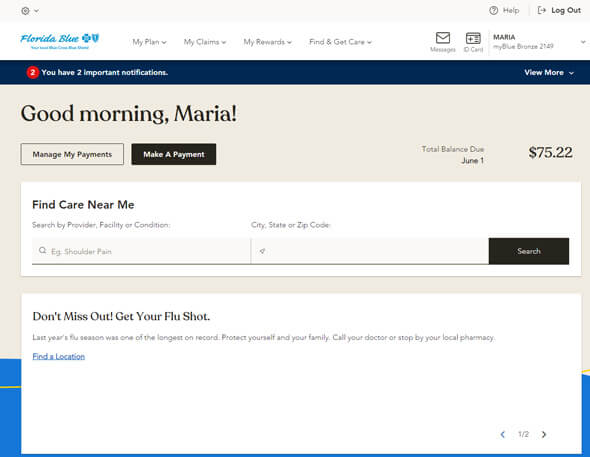
Florida Blue members can pay premiums online, by phone, by mail, through their bank’s bill pay, in the Florida Blue mobile app, or at participating retail locations like CVS and Dollar General using the barcode on their invoice.
Paying Your Florida Blue Bill Online
Florida Blue member account (best for ongoing payments)
- Go to the Payment Options page for individuals: **https://www.floridablue.com/members/individual/payment-options**.
- You can make a first “binder” payment or pay your monthly premium 24/7.
To pay online you’ll typically need one of the following:
- Your member ID number and ZIP code (from your binder email/letter or ID card), or
- Your application ID or Marketplace application ID, or
- Your last name, birth date, and ZIP code
Accepted online methods:
- Credit/debit card
- Checking or savings account (EFT/ACH)
Once logged into your Florida Blue member account, you can:
- Make one‑time payments
- Turn on AutoPay (automatic recurring payments)
- Review billing statements and payment history
- Update your saved payment methods
Paying by Phone
You can pay any time using the automated system:
- Call 1‑800‑352‑2583
- When prompted, say “Make a Payment”
- Follow the voice prompts to enter your member ID and payment details
- Credit/debit cards
- Bank account information (checking or savings)
You’ll get a payment confirmation at the end of the call and can request a text/email or note the confirmation number.
In‑Person Payments at Retail Locations and Florida Blue Centers
To pay in person you must bring the barcode from your Florida Blue invoice.
Retail options:
- CVS/pharmacy (except Target locations) & Navarro Discount Pharmacy
- Accept cash, credit, and debit cards
- Dollar General
- Accepts cash and debit cards (no credit cards)
- Family Dollar
- Accepts cash only
- ACE Cash Express & MoneyGram
Important in‑person details:
- These locations can accept payments up to 999 dollars per policy per 24 hours.
- At Dollar General, if you pay more than 500 dollars, they may need to swipe your card twice.
- Vendors may charge a convenience fee for processing your payment.
Florida Blue Centers:
- Pay in person at a Florida Blue Center (find locations on floridablue.com).
- Centers accept credit and debit cards but not cash.
- You still need the barcode from your bill for fast processing.
Other Payment Options
Pay by mail
- Send the payment stub from your bill along with a check, cashier’s check, or money order for the total amount due.
- Mail to the payment address printed on your invoice (this can vary by plan, so always use the address on your current bill).
- Include your member ID number on the check to ensure proper posting.
Bank bill pay
You can use your bank’s online bill pay:
- Set the payee as “Florida Blue Payment Center” (or as indicated by your bank’s bill‑pay search).
- Use your Florida Blue member ID number as the account number.
- The bank will mail the payment to the address on your invoice.
Bank bill pay is helpful if you already manage all your recurring bills from your bank’s website.
Florida Blue Mobile App
Florida Blue offers a mobile app for iOS and Android that lets you manage both payments and health benefits on the go.
Key features relevant to payments:
- Make premium payments directly in the app
- Review billing statements, update payment methods, and set up automatic payments
- Receive alerts to avoid missed due dates
Additional benefits tools in the member account and app:
- View plan details, deductibles, and out‑of‑pocket maximums
- Check claims status and payment history
- Access a digital member ID card
- Search for in‑network providers and manage prescriptions
The app is designed for secure, on‑the‑go access so you can manage both your payments and health plan benefits from your phone.
FAQs – People Also Ask About Florida Blue Payments and Accounts
How to pay Florida Blue bill online?
To pay your Florida Blue bill online:
- Go to floridablue.com and navigate to “Payment Options” for members.
- Sign in to your member account or use the “pay now” option with your member ID or application information.
- Choose your payment method (credit/debit card or checking/savings account).
- Confirm and submit; you’ll see a payment confirmation you can print, download, or have sent by text/email.
How do I make a payment by phone?
Call 1‑800‑352‑2583 and say “Make a Payment” when prompted.
You’ll be guided through entering your member ID, date of birth, ZIP code, and then your card or bank information. The automated system is available 24/7, and you’ll receive a confirmation after the payment goes through.
Is Florida Blue the same as BCBS of Florida?
Yes. Florida Blue is the brand name for Blue Cross and Blue Shield of Florida, Inc., the Blue Cross Blue Shield licensee for the state of Florida.
So when you see references to BCBSFL or BCBS of Florida in documents or URLs, they refer to the same company that markets health plans under the Florida Blue name.
Is there a Florida Blue mobile app?
Yes. Florida Blue has an official mobile app for iOS and Android devices.
With the app, you can:
- Make premium payments and manage billing methods
- View coverage details, deductibles, and copays
- Track claims status and payment history
- Access your digital member ID card
- Find in‑network doctors and facilities
You can download it for free from the Apple App Store or Google Play by searching for “Florida Blue.”
How do I pay my Florida Blue Insurance?
You can pay your Florida Blue insurance premium in several ways:
- Online or in the app: Log in to your member account and pay by card or bank account, or set up AutoPay.
- By phone: Call 1‑800‑352‑2583 and say “Make a Payment”.
- By mail: Send a check, cashier’s check, or money order with your payment stub to the address on your bill.
- Bank bill pay: Use “Florida Blue Payment Center” as the payee and your member ID as the account number.
- In person: Pay at CVS, Navarro, Dollar General, Family Dollar, some ACE Cash Express and MoneyGram locations, or a Florida Blue Center with the barcode from your invoice.
How do I pay my Florida Blue bill?
Practically, the most convenient options are:
- Member account / app: Make a one‑time payment or turn on automatic monthly payments so your premium is drafted on time.
- Phone: For quick pay without signing in, call 1‑800‑352‑2583 and use the voice prompts.
- Retail cash option: If you prefer cash, bring your barcode to Family Dollar, Dollar General, or CVS/Navarro and pay at the register.
All of these methods credit your Florida Blue account as long as you provide your member ID and invoice barcode correctly.
What is a Florida Blue member account?
A Florida Blue member account is your secure online profile at floridablue.com that lets you manage both billing and health coverage in one place.
With a member account, you can:
- Make payments and set up AutoPay
- View plan details, deductibles, and out‑of‑pocket maximums
- Check claims status and see how services were paid
- Access digital ID cards
- Find in‑network providers and manage prescriptions
It’s essentially your control center for your Florida Blue health plan.
How do I access my Florida Blue Health Plan benefits?
To access your benefits:
- Create or log in to your Florida Blue member account on floridablue.com, or open the Florida Blue mobile app.
- Once logged in, you can:
- See exactly what your plan covers, including preventive services and copays.
- Check deductible and out‑of‑pocket balances.
- Review claims and explanation of benefits (EOBs).
- Use provider search tools to find in‑network doctors, specialists, and hospitals.
Using your member account and app ensures you know your coverage and costs before you get care, and makes it easy to pay your bill from the same place.