

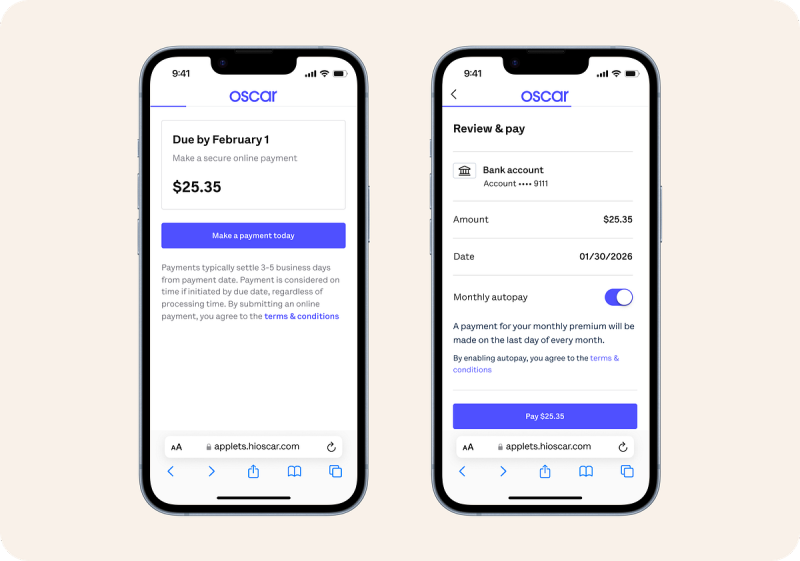
You can pay your Oscar Health premium online through your member account or the mobile app, and you can also pay by phone or mail using a checking account or debit card (no credit cards).
Online and App Payments
- Member payment page: Go to https://www.hioscar.com/member/payment and log in to your Oscar account.
- In your account, choose Billing → Make a payment to:
- Make a one‑time payment.
- Set up autopay so your bill is paid automatically each month.
- Oscar app: Download the Oscar Health app and sign in; under billing you can pay your bill and turn on autopay directly in the app.
Payment methods online/app:
- Checking account (ACH): Allowed for one‑time and recurring (autopay) payments.
- Debit card: Allowed for one‑time payments; not typically used for autopay.
- Credit cards: Not accepted for premiums in most Oscar materials.
Phone and Mail
- Pay by phone:
- Call your Oscar Care Team / Member Services at 1‑855‑672‑2755.
- They can take your checking or savings account details for a one‑time payment or to set up autopay over the phone.
- Pay by check or money order:
- You can mail a check or money order (least preferred option); use the mailing address printed on your Oscar bill and allow extra time (often up to 10 days) for processing.
Autopay Basics
- Autopay uses your checking account (ACH) and can be turned on in your online account or the app, or by calling 1‑855‑672‑2755.
- Once set up, Oscar typically runs your payment automatically on the last day of the month for your premium.
First (Binder) Payment
- New members can usually make their first premium (binder) payment right after enrollment via the secure Oscar payment site linked from their enrollment confirmation or FAQs.
- After that, regular payments are handled at hioscar.com/member/payment or in the app.
Quick FAQs
1. Where do I go to pay Oscar online?
Use https://www.hioscar.com/member/payment, log in, and select Billing → Make a payment.
2. Can I use a credit card to pay my Oscar premium?
No. Oscar documentation says you can pay with a checking account (ACH) or debit card, but credit cards are not accepted for premium payments.
3. How do I set up autopay?
Turn on autopay in your online account or the Oscar app under Billing/Payments, or call 1‑855‑672‑2755 and ask the Care Team to set up recurring payments from your checking account.
4. What if I don’t have my online account yet?
You can create an Oscar member account with your member ID and personal details from your welcome letter, then go to the Payment section to pay or enroll in autopay.